Apple Mac Comparison: Features, Performance, Design, & User Experience Analysis
Apple Mac’s has a range of computers that are designed for different use cases, and in this comparison, we will explore the differences between the iMac, Mac mini, MacBook Pro, and MacBook Air. We will evaluate each computer’s design, performance, software, connectivity, and upgradeability to help you make an informed decision about which one is right for you.
Apple Mac Design and Build Quality
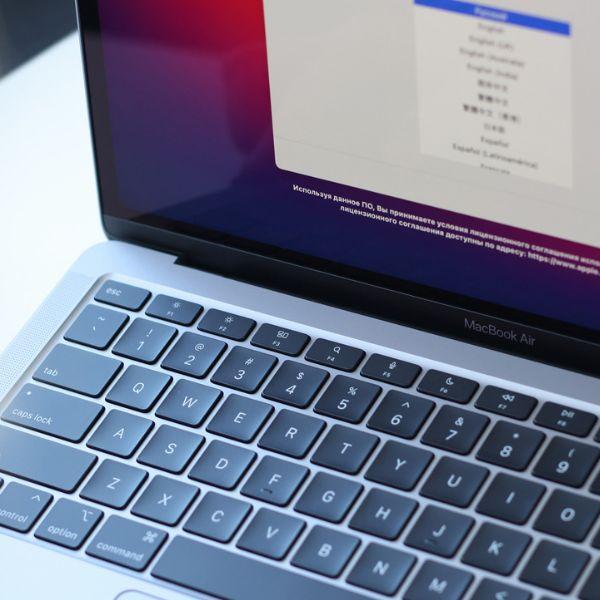
All four Apple computers boast a premium build quality and sleek design. The iMac stands out with its all-in-one design featuring a built-in display, while the Mac mini is a compact desktop computer that doesn’t include a display. The MacBook Pro and MacBook Air belong to the laptop category, with the MacBook Pro being slightly larger and heavier compared to the MacBook Air.
The iMac’s thin and minimalist design enhances the aesthetics of any desk, and it comes in a range of vibrant colors. On the other hand, the Mac mini, being the smallest among the four, offers exceptional portability due to its lightweight construction. Both the MacBook Pro and MacBook Air feature a premium metal design that not only looks impressive but also feels sturdy.
Performance
The iMac, Mac mini, MacBook Pro, and MacBook Air all have different levels of performance, depending on the model you choose. The iMac is the most powerful of the four, with the latest models featuring up to 10-core processors, up to 128GB of RAM, and up to 8TB of storage.
The Mac mini is a powerful desktop computer that can handle demanding tasks such as video editing and 3D rendering. It is available with either an Intel or Apple M1 processor, and it can be configured with up to 16GB of RAM and 2TB of storage.
The MacBook Pro is a powerful laptop that is designed for professionals who require a high level of performance. It is available with up to a 10th-generation Intel Core i9 processor, up to 32GB of RAM, and up to 4TB of storage.
The MacBook Air is a lightweight and portable laptop that is designed for everyday use. It is available with up to an Apple M1 processor, up to 16GB of RAM, and up to 2TB of storage.
Software
All four of these Apple Mac computers run on macOS, which is Apple’s proprietary operating system. macOS is known for its user-friendly interface and seamless integration with other Apple products.
The iMac, Mac mini, and MacBook Pro come with a suite of productivity applications such as Pages, Keynote, and Numbers, which are equivalent to Microsoft Office. The MacBook Air comes with a slimmed-down version of these applications.
The iMac and Mac mini also come with a variety of other software, including the Safari web browser, iTunes, and iMovie. The MacBook Pro and MacBook Air are designed for portability, so they come with a minimal amount of pre-installed software.
How Connective Are Apple Macs?
The iMac and Mac mini both feature a variety of ports, including Thunderbolt 3 (USB-C), USB-A, Ethernet, HDMI, and an SDXC card slot, depending on the model you choose. This makes the iMac and Mac mini versatile desktop computers that can connect to a wide range of peripherals and devices.
The MacBook Pro and MacBook Air both feature Thunderbolt 3 (USB-C) ports, which can be used to connect to a variety of peripherals and devices. The MacBook Pro also features an HDMI port, while the MacBook Air features a headphone jack.
Upgradability
The iMac, MacBook Pro, and MacBook Air have limited upgradability compared to the Mac mini. The iMac’s components are tightly integrated into its all-in-one design, making it challenging for users to upgrade internal hardware. However, some iMac models allow for user-upgradable RAM, which provides the opportunity to increase system memory after purchase.
Similarly, the MacBook Pro and MacBook Air prioritize slimness and portability, resulting in more compact and sealed designs. As a result, upgrading internal components such as the processor or storage is not easily achievable by the average user. However, certain MacBook Pro models have user-upgradable RAM, allowing for memory upgrades.
It’s worth noting that while internal hardware upgrades may be limited, external expansion options are available for all these Apple Macs. For instance, users can expand storage capacity by connecting external hard drives or utilizing cloud storage solutions. Additionally, various ports and connectivity options on these devices allow for the connection of external displays, peripherals, and accessories to enhance functionality and meet specific needs.
Conclusion
In summary, the Apple Macs: iMac, Mac Mini, MacBook Pro, and MacBook Air are all great computers, designed for different use cases. The iMac is a powerful all-in-one desktop computer that is great for demanding tasks, while the Mac mini is a compact and versatile desktop computer that can handle demanding tasks as well. The MacBook Pro is a powerful laptop that is designed for professionals who require a high level of performance, while the MacBook Air is a lightweight and portable laptop that is great for everyday use.